WCF service and client do not support HTTP Compression out of the box in .NET 3.5 even if you turn on Dynamic Compression in IIS 6 or 7. It has been fixed in .NET 4 but those who are stuck with .NET 3.5 for foreseeable future, you are out of luck. First of all, it’s IIS fault that it does not enable http compression for SOAP messages even if you turn on Dynamic Compression in IIS 7. Secondly, it’s WCF’s fault that it does not send the Accept-Encoding: gzip, deflate header in http requests to the server, which tells IIS that the client supports compression. Thirdly, it’s again WCF fault that even if you make IIS to send back compressed response, WCF can’t process it since it does not know how to decompress it. So, you have to tweak IIS and System.Net factories to make compression work for WCF services. Compression is key for performance since it can dramatically reduce the data transfer from server to client and thus give significant performance improvement if you are exchanging medium to large data over WAN or internet.
There are two steps – first configure IIS, then configure System.Net. There’s no need to tweak anything in WCF like using some Message Interceptor to inject HTTP Headers as you find people trying to do here, here and here.
Configure IIS to support gzip on SOAP respones
After you have enabled Dynamic Compression on IIS 7 following the guide, you need to add the following block in the <dynamicTypes> section of applicationHost.config file inside C:WindowsSystem32inetsrvconfig folder. Be very careful about the space in mimeType. They need to be exactly the same as you find in response header of SOAP response generated by WCF services.
<add mimeType="application/soap+xml" enabled="true" />
<add mimeType="application/soap+xml; charset=utf-8" enabled="true" />
<add mimeType="application/soap+xml; charset=ISO-8895-1" enabled="true" />
After adding the block, the config file will look like this:
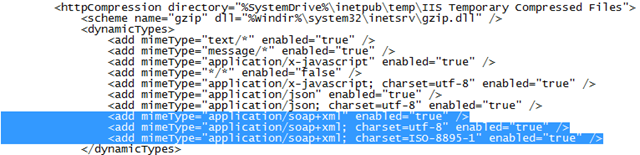
For IIS 6, first you need to first enable dynamic compression and then allow the .svc extension so that IIS compresses responses from WCF services.
Next you need to make WCF send the Accept-Encoding: gzip, deflate header as part of request and then support decompressing a compressed response.
Send proper request header in WCF requests
You need to override the System.Net default WebRequest creator to create HttpWebRequest with compression turned on. First you create a class like this:
public class CompressibleHttpRequestCreator : IWebRequestCreate
{
    public CompressibleHttpRequestCreator()
    {
    }

    WebRequest IWebRequestCreate.Create(Uri uri)
    {
        HttpWebRequest httpWebRequest =
            Activator.CreateInstance(typeof(HttpWebRequest),
            BindingFlags.CreateInstance | BindingFlags.Public |
            BindingFlags.NonPublic | BindingFlags.Instance,
            null, new object[] { uri, null }, null) as HttpWebRequest;

        if (httpWebRequest == null)
        {
            return null;
        }

        httpWebRequest.AutomaticDecompression = DecompressionMethods.GZip |
            DecompressionMethods.Deflate;

        return httpWebRequest;
    }
}
Then on the WCF Client application’s app.config or web.config, you need to put this block inside system.net which tells system.net to use your factory instead of the default one.
<system.net>
  <webRequestModules>
    <remove prefix="http:"/>
    <add prefix="http:" type="WcfHttpCompressionEnabler.CompressibleHttpRequestCreator, WcfHttpCompressionEnabler,
        Version=1.0.0.0, Culture=neutral, PublicKeyToken=null" />
  </webRequestModules>
</system.net>
That’s it.
I have uploaded a sample project which shows how all these works.
Just to sure this is only a problem with WCF 3.5 and not 4.0.
No changes are required.
Also if a project is upgraded from 3.5 to 4.0, Are these changes required or the use of 4.0 assemblies pick it up.
This MSDN blog says it is automatic in WCF 4 to negotiate gzip compression with server.
http://blogs.msdn.com/b/drnick/archive/2009/08/12/what-s-new-in-wcf-4-channels.aspx
Thanks! you just saved a hell-lot-of traffic 😉
Followed your example and got compression enabled. I have encountered a problem when POSTing a web service request. It does not seem to be compressing on the post.
ex:
POST http://test.mysite.com/service.asmx HTTP/1.1
Content-Type: text/xml; charset=utf-8
SOAPAction: “http://mysite.com/RunProcess”
Host: test.mysite.com
Content-Length: 328719
Expect: 100-continue
Connection: Keep-Alive
Accept-Encoding: gzip, deflate <====== Is not adding/including this in the header.
What else do I need to adjust to obtain this.
Hello,
i want to say thank you for a great job you’ve done on your blog.
I have a software download website and I also write articles for people to help them with their computers and software. Is it possible to place this article on your blog as a guest post?
Regards,
Andy G.
The article is good.
how can we pass dataset to web service dynamically is this is best way? what are the other ways to do it
Pass objects and collections, instead of dataset. dataset is bloated.
Great article. You save me a lot of time! Great job!
Is it possible to do section of config file programmatically?
Is it possible to accomplish this when not using IIS to host the WCF .NET 3.5 web services? (we use many user specific, separate processes loaded dynamically).
Can we mix and use WCF .NET 3.5 on the client and WCF 4.0 on the server as another way to accomplish this?
Our client programs are installed by customers all over the world and it takes a year’s availability to require a client upgrade.
I am afraid you need the system.net change on the client. Otherwise it won’t ask for compressed content and IIS won’t deliver compressed content.
Maybe you can try writing a WCF filter that will always send back compressed content. The client might detect that and auto decompress. Haven’t tried myself.
Thank you!
If the server side can easily handle some clients with gzip and others without then we can add the system.net change to the latest version of the client. We just can’t force customers to take it until it’s been out about a year. Between the customer’s departmental work cycle and their IT department, new version deployments are tough to deploy quickly. We have three supported versions of the client right now. It’s much like IE in that sense. We drop support after about a year.
But this would be a major motivator for customers to upgrade.